Git-backed shared memory
Brainstack lets the AI tools you already use share context without moving your brain into a hosted assistant. Codex, Claude, Cursor, scripts, and private workers read the same repo-backed memory, while Brainstack adds search, proposals, skills, hooks, and local capabilities around it.
- Start local, add the fleet later
- Raw logs become reviewed proposals, not blind memory
- Optional Mac and Telegram control surfaces
Smallest proof
Try the core loop before wiring a fleet
The cleanest first touch is a disposable local smoke: clone Brainstack, let the CLI create a temporary shared-brain repo under /tmp, run doctor, and build the local search index. No Telegram bot, worker, or Tailscale exposure is needed for this proof.
Local product smoke
git clone https://github.com/Caimeo-com/brainstack ~/brainstack
cd ~/brainstack
bun install --frozen-lockfile
bun run packages/brainctl/src/main.ts smoke --profile single-node --config examples/single-node.yamlWhat it is
A private shared brain for tools and machines
Brainstack gives agent tools a durable place to remember what happened, save useful context, and find it again. The source of truth is a git repo with markdown, skills, transcripts, and artifacts. Brainstack adds local search, write paths, health checks, client bootstrap, optional Telegram control, file relay, and worker routing.
Product code and brain data stay separate
The Brainstack repo contains the services and CLI. Your shared brain remains its own repo. That split matters: upgrades can refresh services and runtime files without rewriting the knowledge base your tools depend on.
- braindLocal service that lets tools search and read the shared brain.
- brainctlCLI for provisioning, enrollment, health checks, backups, recovery, and file relay.
- client bootstrapCodex gets installable Brainstack skills; Claude and Cursor get checked-in shared-brain guidance.
- telemuxOptional Telegram topics mapped to durable work contexts and file delivery.
Curated memory
Evidence becomes proposals before it becomes memory
Most tools call any saved note "memory." Brainstack keeps the raw evidence, then asks the curator to turn it into scoped, reviewable changes that future agents can understand without the original chat.
How it works
Three simple pieces
Git is the memory
Everything you store, from LLM chat transcripts to markdown pages, skills, notes, and artifacts, lives in the shared-brain repo and feeds fast local search.
Tools share the same context
Codex, Claude, Cursor, and scripts can all read the same memory instead of each tool starting over with its own scattered notes.
Your machines do the work
Run jobs on your own Mac, Linux box, or private tailnet workers. Telegram is optional; it is just a phone-friendly control surface.
Pick your first win
Different users should not start in the same runbook
Brainstack can become a fleet control layer, but the first outcome should be smaller: stop re-explaining work, prove safer memory, or get a Mac client enrolled cleanly.
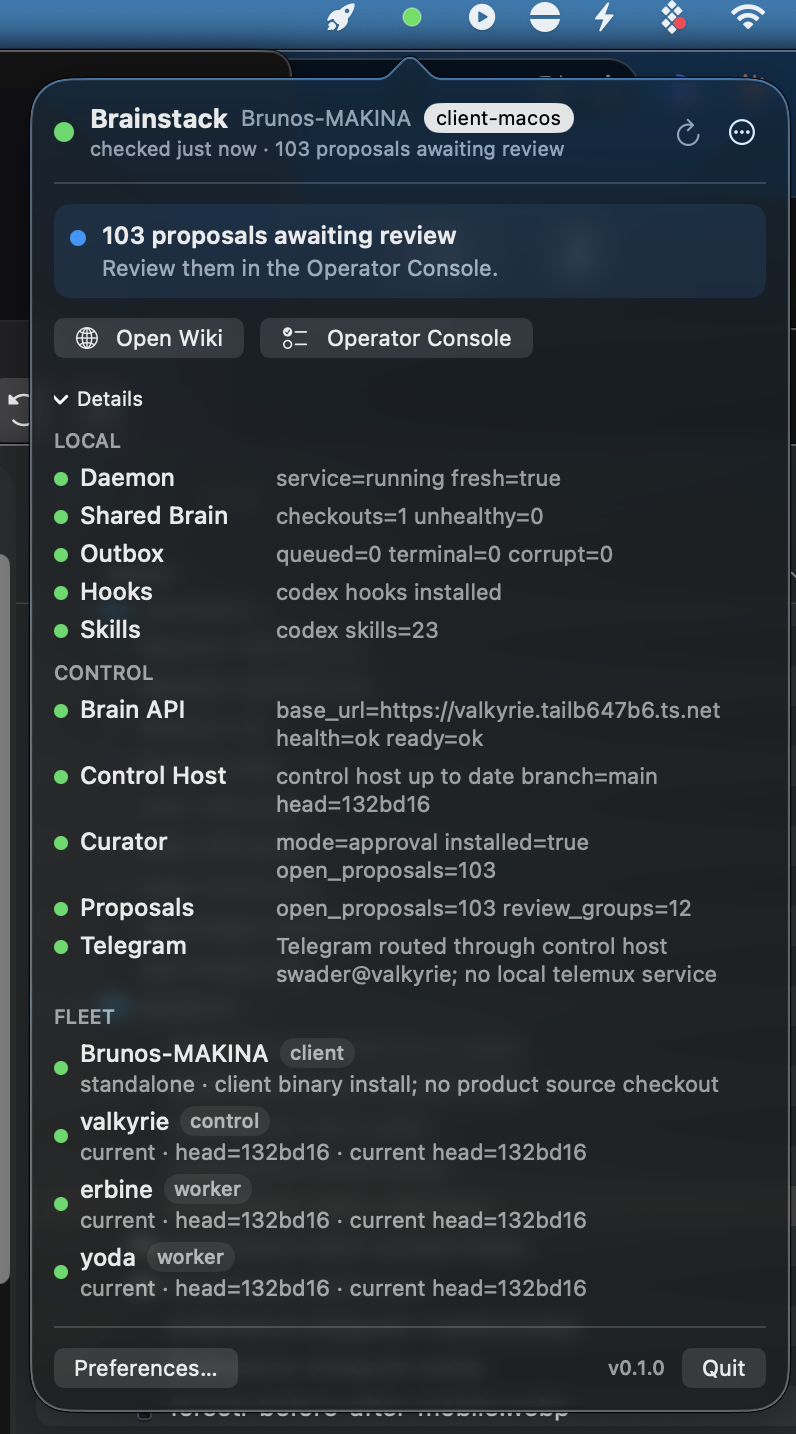
Docs
Choose the right Brainstack setup path
Brainstack has a lot of operating surface: install roles, Mac enrollment, capabilities, skills, hooks, curation, Telegram, workers, and trust boundaries. The docs split those flows into focused pages so you can start with the path that matches your machine and role.
brainctl doctor, then try one concrete capability such as local voice transcription. The docs walk through that path without crowding this page.
Bring existing context
Brainstack should start with what you already taught your tools
Cold-start memory is a product smell. Brainstack can plan imports from Codex skills, Claude and Cursor guidance, local markdown, and repo docs, then turn selected items into shared-brain imports or proposal-ready evidence.
brainctl import skills
Scans current and default harness skill locations, prints a deterministic plan, and writes only when you add --apply.
brainctl import skill URL_OR_PATH
Imports one skill from a local folder/file or source URL so connected harnesses can refresh it locally.
brainctl status --json
Gives the Mac app and automation a bounded status surface for daemon, hooks, skills, proposals, and fleet freshness.
Features
The parts operators usually end up building by hand
Local search over the shared brain
Search uses derived local indexes, while markdown and artifacts remain reviewable in git.
Agent-friendly save path
Agents can save transcripts, notes, artifacts, and draft changes without pushing directly to the shared-brain repo.
Quiet Telegram control plane
Short status, liveness, usage, and recap messages avoid accidental full-session resumes; file, machine, scheduling, and code work still take the durable path.
Machine-to-Telegram file relay
Send yourself a PDF, log, image, or build artifact from an enrolled machine; the file streams through the control host's telemux path.
Deterministic runtime rendering
Generated runtime env files are separate from operator-owned secrets env files, and services run without ambient repo env files.
Agent-ready runbooks
Codex gets installable Brainstack skills, while Claude and Cursor get concrete shared-brain guidance from checked-in templates.
Doctor-first operations
Health checks report Bun, Git, SSH, Tailscale, harness paths, worker trust, services, and queued work.
Trust boundary
Private by default, explicit when it writes
The default Brainstack posture is one private network, one shared-brain repo, and clients that propose instead of mutating canon directly. The full trust model is in docs, but the pilot boundary should be clear before anyone installs it.
braind to the public internet.
brainctl paths.
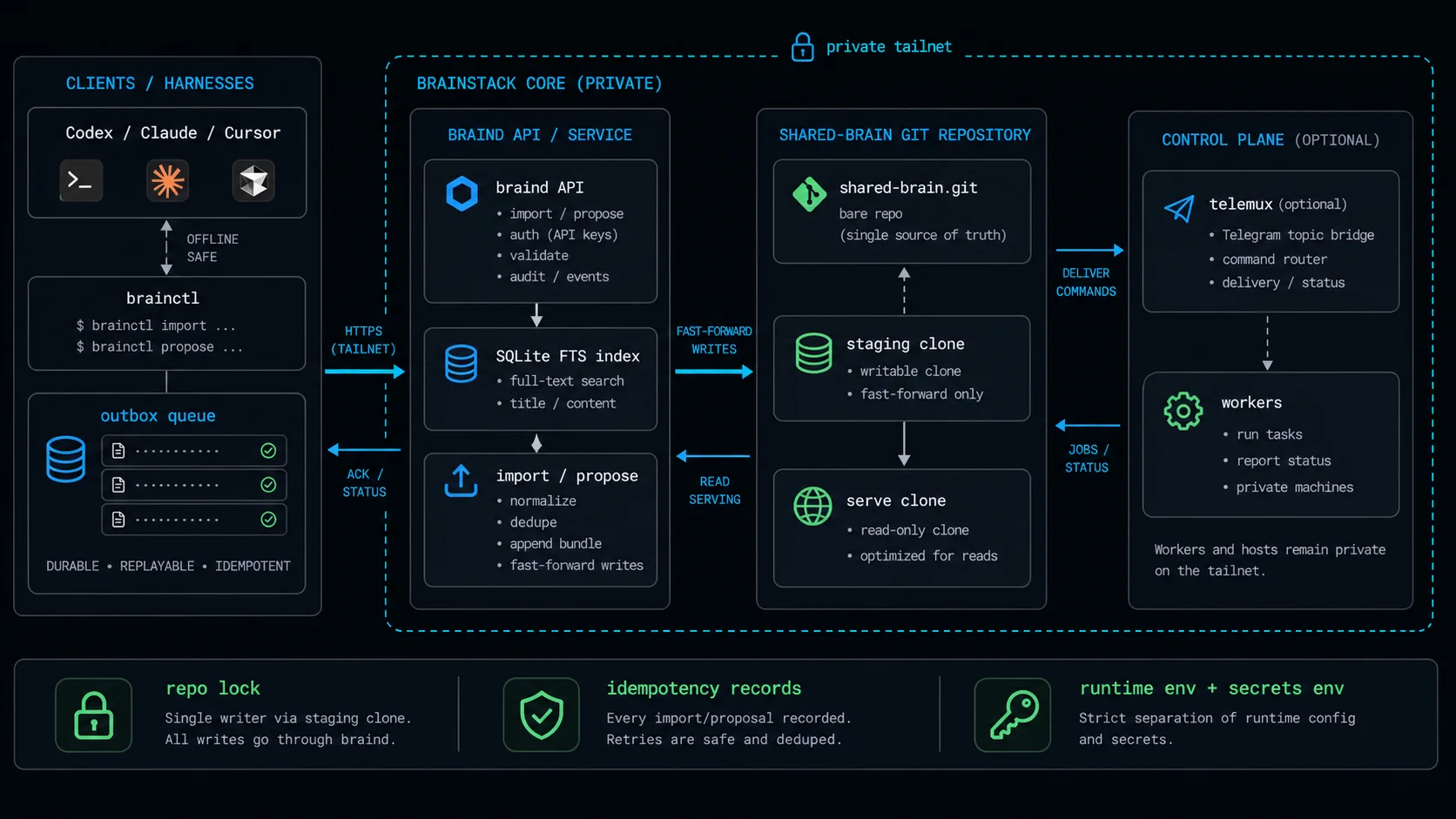
Architecture diagram with agent tools on the left, brainctl and braind in the middle, the shared-brain git repository as the memory source, optional Telegram control, and private workers on the tailnet.
FAQ
Common questions
/tmp, runs doctor, and builds the search index without wiring Telegram, a worker, or Tailscale exposure.
brainctl binary with client bootstrap assets and public skills embedded, so they do not need Bun or a Brainstack source checkout. Control hosts and source-run workers still need Bun because they run Brainstack services from source.
client, operator, control, or worker; check Git, SSH, Tailscale, and the selected harness; stop for missing Tailscale login or other prerequisites; enroll with --invite-file; then run brainctl doctor. It should not invent tokens, hostnames, or SSH pins.
brainctl telegram send-file streams the file over SSH to the control host and lets telemux deliver it. The command rejects symlinks, oversized files, and sensitive-looking filenames unless you explicitly override the guard.
Get started
Bring one private machine and one shared-brain repo.
That is enough for the first pass: bring up one control host, connect the shared-brain repo, prove doctor is clean, then decide which Mac, Linux, Telegram, and worker surfaces are worth adding.